時節柄、人が集まった場合に換気を促すようにしようと思った。
そこで、現在使っている Netatmo Weather Station のCO2濃度の情報を基に、合成音声を出力することを試すことにした。
最初は、Raspberry Pi などの Linux を使おうかと思ったが、ESP32 でも必要なライブラリがあり、比較的容易にプログラムが作成できそうなので、スピーカーのついている M5Atom Echo で動作させることにした。
まずは、Netatmo のAPIを利用してCO2濃度を取得する部分を作成した。
機能的には単純なプログラムだが、JSONの処理に使った ArduinoJson のバッファサイズが不足していて、正常に動作せず、原因がわかるまでに時間がかかった。後で示すプログラム例では、4096にしているが、Netatmoのステーションに接続されているデバイスが多い場合には不足する可能性があるので、調整が必要である。
また、Netatmo の API では、access token を取得し、それを利用して観測データを取得するようになっている。access token には有効期限があることになり、refresh token を利用して、access token をリフレッシュすることになっている。
しかし、access token、refresh token はいつも同じで、リフレッシュをしても access token が変わらない。それで良いものなのか?
また、予想よりも Netatmoへの HTTP request がタイムアウトを含めた失敗率が高く、エラー時のリトライをそれなりにしないと、処理が進まなくなったりした。
備忘録として残しておく。
目次
使用機材と環境
資料機材
開発環境
Visual Studio Code 1.51.1
PlatformIO IDE for VSCode Core 5.0.3 Home 3.3.1
利用したライブラリの依存グラフ
|
1 2 3 4 5 6 7 8 9 10 11 12 13 14 15 16 |
Dependency Graph |-- <M5Atom> 0.0.1 | |-- <FastLED> 3.3.3 | | |-- <SPI> 1.0 | |-- <Wire> 1.0.1 |-- <FastLED> 3.3.3 | |-- <SPI> 1.0 |-- <ArduinoJson> 6.17.2 |-- <ArduinoLog> 1.0.3 |-- <WiFi> 1.0 |-- <WiFiClientSecure> 1.0 | |-- <WiFi> 1.0 |-- <HTTPClient> 1.2 | |-- <WiFi> 1.0 | |-- <WiFiClientSecure> 1.0 | | |-- <WiFi> 1.0 |
プログラム
Netatmo Weather Station のCO2濃度の情報を取得する部分をまず実装した。
https://dev.netatmo.com/ に記載されている API を利用して、Netatmo から情報を取得する。https の post request によって、認証を行い、access token を取得する。
OAuth2を利用したインタフェースが用意されているが、M5Atomのようなブラウザを持たないデバイス向きのインタフェースがない。
しかたがないので、「This method should only be used for personal use and testing purpose. 」と書いてあるユーザ名とパスワードを指定する方法を使うことにした。
https でのアクセスのためには、WiFiClientSecureを利用した。 arduino-esp32 に含まれるサンプルプログラム BasicHttpsClient.ino を基にしてネットワーク部分を作成する。
request に対する response は JSON形式である。必要なデータを抽出するために ArduinoJson ライブラリを用いた。
netatmo-access.cpp
netatmo APIを利用して二酸化炭素濃度を取得するための関数を含んでいる。
|
1 2 3 4 5 6 7 8 9 10 11 12 13 14 15 16 17 18 19 20 21 22 23 24 25 26 27 28 29 30 31 32 33 34 35 36 37 38 39 40 41 42 43 44 45 46 47 48 49 50 51 52 53 54 55 56 57 58 59 60 61 62 63 64 65 66 67 68 69 70 71 72 73 74 75 76 77 78 79 80 81 82 83 84 85 86 87 88 89 90 91 92 93 94 95 96 97 98 99 100 101 102 103 104 105 106 107 108 109 110 111 112 113 114 115 116 117 118 119 120 121 122 123 124 125 126 127 128 129 130 131 132 133 134 135 136 137 138 139 140 141 142 143 144 145 146 147 148 149 150 151 152 153 154 155 156 157 158 159 160 161 162 163 164 165 166 167 168 169 170 171 172 173 174 175 176 177 178 179 180 181 182 183 184 185 186 187 188 189 190 191 192 193 194 195 196 197 198 199 200 201 202 203 204 205 206 207 208 209 210 211 212 213 214 215 216 217 218 |
/** This file is based on BasicHTTPSClient.ino https://github.com/espressif/arduino-esp32/tree/master/libraries/HTTPClient/examples/BasicHttpsClient */ #include <Arduino.h> #include <WiFi.h> #include <WiFiMulti.h> #include <HTTPClient.h> #include <WiFiClientSecure.h> #include <ArduinoJson.h> #include <ArduinoLog.h> #include "mysettings.h" #define CO2_WARNING_LEVEL 800 //#define DISABLE_LOGGING #define JSON_DOC_SIZE 4096 String serverURL = "https://api.netatmo.com/oauth2/token"; String apiURL = "https://api.netatmo.com/api"; String separator = "&"; String getTokenMsg = "grant_type=password" + separator + "client_id=" + MY_NETATMO_CLIENT_ID + separator + "client_secret=" + MY_NETATMO_CLIENT_SECRET + separator + "username=" + MY_NETATMO_USERNAME + separator + "password=" + MY_NETATMO_PASSWORD + separator + "scope=read_station"; String refreshTokenMsg = "grant_type=refresh_token" + separator + "client_id=" + MY_NETATMO_CLIENT_ID + separator + "client_secret=" + MY_NETATMO_CLIENT_SECRET + separator; String getStationDataURL = apiURL + "/getstationsdata?" + "device_id=" + MY_NETATMO_DEVICE_ID + "&" + "get_favorites=false"; String postRequest(WiFiClientSecure *client, String serverURL, String message, String tag) { HTTPClient https; String value; Log.notice("postRequest(%X, %s, %s, %s)\n", client, serverURL.c_str(), message.c_str(), tag.c_str()); if (https.begin(*client, serverURL)) { https.addHeader( "User-Agent", "ESP32/1.0"); https.addHeader( "Connection", "close"); https.addHeader( "Content-Type", "application/x-www-form-urlencoded;charset=UTF-8"); // start post request int httpCode = https.POST(message); // httpCode will be negative on error if (httpCode > 0) { // HTTP header has been send and Server response header has been handled Log.notice("httpCode: %d\n", httpCode); String response = https.getString(); Log.notice("response=%s\n", response.c_str()); // file found at server if (httpCode == HTTP_CODE_OK || httpCode == HTTP_CODE_MOVED_PERMANENTLY) { DynamicJsonDocument doc(JSON_DOC_SIZE); deserializeJson(doc, response); JsonObject obj = doc.as<JsonObject>(); value = obj[tag].as<String>(); } } else { Log.warning("[HTTPS] POST... failed, error: %s\n", https.errorToString(httpCode).c_str()); } https.end(); } else { Log.warning("[HTTPS] https.begin failed...\n"); } Log.notice("value=%s\n", value.c_str()); return value; } String getAccessToken(WiFiClientSecure *client) { String tag = "access_token"; String accessToken = postRequest(client, serverURL, getTokenMsg, tag); return accessToken; } String getRefreshToken(WiFiClientSecure *client) { String tag = "refresh_token"; String refreshToken = postRequest(client, serverURL, getTokenMsg, tag); return refreshToken; } String refreshAccessToken(WiFiClientSecure *client, String refreshToken) { String tag = "access_token"; String refreshAccessTokenBody = refreshTokenMsg + "refresh_token=" + refreshToken; String accessToken = postRequest(client, serverURL, refreshAccessTokenBody, tag); return accessToken; } String getRequest(WiFiClientSecure *client, String requestURL, String accessToken) { HTTPClient https; String response; Log.notice("getRequest(%X, %s, %s)\n", client, requestURL.c_str(), accessToken.c_str()); if (https.begin(*client, requestURL)) { //https.addHeader( "Host", host); https.addHeader( "Accept", "application/json"); https.addHeader( "Authorization", "Bearer " + accessToken); Log.notice("[HTTPS] GET...\n"); // start connection and send HTTP header int httpCode = https.GET(); // httpCode will be negative on error if (httpCode > 0) { // HTTP header has been send and Server response header has been handled Log.notice("[HTTPS] GET... code: %d\n", httpCode); response = https.getString(); if (httpCode == HTTP_CODE_OK || httpCode == HTTP_CODE_MOVED_PERMANENTLY) { Log.notice("httpCode=%d, response=%s\n", httpCode, response.c_str()); } else { Log.warning("httpCode=%d, response=%s\n", httpCode, response.c_str()); } } else { Log.warning("[HTTPS] GET... failed, error: %s\n", https.errorToString(httpCode).c_str()); } https.end(); } else { Serial.print("[HTTPS] https.begin failed...\n"); } return response; } int getCO2value(WiFiClientSecure *client, String accessToken, String locationName) { int co2value = -1; String response = getRequest(client, getStationDataURL, accessToken); if ( response != "" ) { DynamicJsonDocument doc(JSON_DOC_SIZE); deserializeJson(doc, response); JsonObject obj = doc.as<JsonObject>(); JsonObject body = obj["body"]; JsonArray devices = body["devices"]; for ( auto device : devices ) { String station_name = device["station_name"]; String module_name = device["module_name"]; Log.notice("station_name=%s, module_name=%s, locationName=%s ==> %d\n", station_name.c_str(), module_name.c_str(), locationName.c_str(), ( locationName == module_name ) ); if ( locationName == module_name ) { co2value = device["dashboard_data"]["CO2"]; Log.notice("co2value=%d\n", co2value); } else { JsonArray modules = device["modules"]; for (auto module : modules ) { module_name = module["module_name"].as<String>(); Log.notice("module_name=%s\n", module_name.c_str()); if ( locationName == module_name ) { co2value = module["dashboard_data"]["CO2"]; Log.notice("co2value=%d\n", co2value); } } } } } return co2value; } void cleanupClient(WiFiClientSecure *client) { if (client->connected()) client->stop(); delete client; } String composeMessage(String targetLocation, bool forced) { Log.notice("composeMessage(%d)\n", forced); WiFiClientSecure *client = new WiFiClientSecure; if ( client == NULL ) { Log.error("Unable to create client\n"); return "_fail"; } // get access token String accessToken = getAccessToken(client); if ( accessToken == "" ) { Log.error("getAccessToken failed.\n"); cleanupClient(client); return "_fail"; } // get CO2 value int co2value = getCO2value(client, accessToken, targetLocation); if ( co2value < 0 ) { Log.error("getCO2value failed.\n"); cleanupClient(client); return "_fail"; } // clean up client cleanupClient(client); String message; if ( co2value >= CO2_WARNING_LEVEL || forced ) { message = targetLocation + "のCO2濃度は、" + co2value + " ppmです。"; } if ( co2value >= CO2_WARNING_LEVEL ) { message = message + "窓を開けるなどして、換気してください。"; } Log.notice("message='%s'\n", message.c_str()); return message; } |
m5atom-netatmo.cpp
m5atom-netatmo.cpp は、netatmo-access.cppで定義されている関数のテストプログラムである。二酸化炭素濃度を取得して、テキストとして出力する。10分おきに取得とテキスト出力を繰り返すようにしている。
テストプログラムでは access token のリフレッシュの確認を行うために、まず最初に 関数getRefreshTokenを使ってrefresh token を取得し、それを使用した関数 refreshAccessTokenによって (リフレッシュした)access token を取得している。
このような使い方の場合には、refresh token やリフレッシュは不要であり、関数 getAccessTokenによって最初から access token を取得すれば良い。
access token を使い、関数getCO2value によって、Netatmo weather station のデータを取得する。
関数 decrementFuse はエラー時に呼び出し、エラーの回数が INITIAL_RESET_FUSE を超えた場合には、システムをリセットし、プログラムを最初から実行する。
関数 restoreFuse は、エラーの回数をリセットする。
m5stack atom echo/lite の 1つの(最初の)LED を初期状態でBlue、正常動作中はGreen、エラー発生時はRed、待ち時間中はYellowになるようにしている。
|
1 2 3 4 5 6 7 8 9 10 11 12 13 14 15 16 17 18 19 20 21 22 23 24 25 26 27 28 29 30 31 32 33 34 35 36 37 38 39 40 41 42 43 44 45 46 47 48 49 50 51 52 53 54 55 56 57 58 59 60 61 62 63 64 65 66 67 68 69 70 71 72 73 74 75 76 77 78 79 80 81 82 83 84 85 86 87 88 89 90 91 92 93 94 95 96 97 98 99 100 101 102 103 104 105 106 107 108 109 110 111 112 113 114 115 116 117 118 119 120 121 122 123 124 125 126 127 128 129 130 131 132 133 134 135 136 137 138 139 140 141 142 143 144 145 146 147 148 149 150 151 152 153 154 155 156 157 158 159 160 161 162 163 164 165 166 167 168 169 170 171 172 173 174 175 176 177 178 179 180 181 182 183 184 185 186 187 188 189 |
#include <Arduino.h> #include <M5Atom.h> #include <WiFi.h> #include <WiFiMulti.h> #include <WiFiClientSecure.h> #include <ArduinoLog.h> #include "mysettings.h" #include "netatmo-access.h" #define INTERVAL_IN_MINUTE 10 const char* ssid = MY_WIFI_SSID; const char* password = MY_WIFI_PASSWORD; WiFiMulti WiFiMulti; String targetLocation = MY_TARGET_LOCATION; String speaker = MY_GOOGLE_HOME; #define GREEN_COLOR 0xff0000 #define RED_COLOR 0x00ff00 #define BLUE_COLOR 0x0000ff #define YELLOW_COLOR 0xffff00 void setLEDRed() { M5.dis.drawpix(0, RED_COLOR); } void setLEDGreen() { M5.dis.drawpix(0, GREEN_COLOR); } void setLEDBlue() { M5.dis.drawpix(0, BLUE_COLOR); } void setLEDYellow() { M5.dis.drawpix(0, YELLOW_COLOR); } #define INITIAL_RESET_FUSE 5 #define RETRY_DELAY_IN_SEC 10 //declare reset function at address 0 void(* resetFunc) (void) = 0; // CPU reset static int fuse = INITIAL_RESET_FUSE; void restoreFuse() { fuse = INITIAL_RESET_FUSE; setLEDGreen(); } void decrementFuse() { setLEDRed(); if ( fuse-- <= 0 ) { resetFunc(); // reset } else { delay(RETRY_DELAY_IN_SEC*1000); } } // print current time void printCurrentTime() { time_t nowSecs = time(nullptr); struct tm timeinfo; gmtime_r(&nowSecs, &timeinfo); Serial.print("Current time: "); Serial.print(asctime(&timeinfo)); } // Setting clock just to be sure... void setClock() { configTime(0, 0, "ntp.nict.jp", "pool.ntp.org", "time.nist.gov"); Serial.print("Waiting for NTP time sync: "); time_t nowSecs = time(nullptr); while (nowSecs < 8 * 3600 * 2) { delay(500); Serial.print("."); yield(); nowSecs = time(nullptr); } Serial.println(); printCurrentTime(); } void setup() { Serial.begin(115200); M5.begin(true, false, true); Log.begin(LOG_LEVEL_VERBOSE, &Serial, true); //Log.begin(LOG_LEVEL_WARNING, &Serial, true); setLEDBlue(); Serial.println(); Serial.println(); Serial.println(); WiFi.mode(WIFI_STA); WiFiMulti.addAP(ssid, password); // wait for WiFi connection Serial.print("Waiting for WiFi to connect"); while ((WiFiMulti.run() != WL_CONNECTED)) { Serial.print("."); decrementFuse(); } restoreFuse(); Serial.println(" connected"); IPAddress ipAddress = WiFi.localIP(); Log.notice("IP address: %d.%d.%d.%d\n", ipAddress[0], ipAddress[1], ipAddress[2], ipAddress[3]); //Print the local IP byte mac[6]; WiFi.macAddress(mac); //Log.notice("MAC: %x:%x:%x:%x:%x:%x\n", mac[5], mac[4], mac[3], mac[2], mac[1], mac[0]); // sync clock with NTP setClock(); } time_t waitingFor() { int minute = INTERVAL_IN_MINUTE; String waitingMessage = String("Waiting for ") + minute + " minute(s) before the next round..."; Log.notice("%s\n", waitingMessage.c_str()); return time(nullptr) + minute*60; } time_t nextTime = 0; void loop() { time_t currentTime = time(nullptr); bool pressed = M5.Btn.isPressed(); if ( nextTime < currentTime || pressed ) { setLEDGreen(); WiFiClientSecure *client = new WiFiClientSecure; if ( client == NULL ) { Log.error("Unable to create client\n"); decrementFuse(); return; } // get refresh token String refreshToken = getRefreshToken(client); if ( refreshToken == "" ) { Log.error("getRefreshToken failed.\n"); cleanupClient(client); decrementFuse(); return; } // refresh access token String accessToken = refreshAccessToken(client, refreshToken); if ( accessToken == "" ) { Log.error("refreshAccessToken failed.\n"); cleanupClient(client); decrementFuse(); return; } // get CO2 value int co2value = getCO2value(client, accessToken, targetLocation); if ( co2value < 0 ) { Log.error("getCO2value failed.\n"); cleanupClient(client); decrementFuse(); return; } // clean up client cleanupClient(client); String message = targetLocation + "のCO2濃度は、" + co2value + " ppmです。"; Serial.println(message); printCurrentTime(); nextTime = waitingFor(); setLEDYellow(); } M5.update(); } |
netatmo-access.h
m5atom-netatmo.cppで定義している外部から利用する関数のプロトタイプ宣言を含んでいる。
|
1 2 3 4 5 6 7 8 9 10 |
#include <Arduino.h> #include <WiFiClientSecure.h> extern String getAccessToken(WiFiClientSecure *client); extern String getRefreshToken(WiFiClientSecure *client); extern String refreshAccessToken(WiFiClientSecure *client, String refreshToken); extern int getCO2value(WiFiClientSecure *client, String accessToken, String locationName); extern void cleanupClient(WiFiClientSecure *client); extern String composeMessage(String targetLocation, bool forced); |
mysettings.h
環境に依存する値などを設定するヘッダファイルである。このファイルに含まれるマクロには適切な値を環境に合わせて適切に行う必要がある。
MY_WIFI_SSID、MY_WIFI_PASSWORD には WiFiのSSID 、パスワードを設定する。
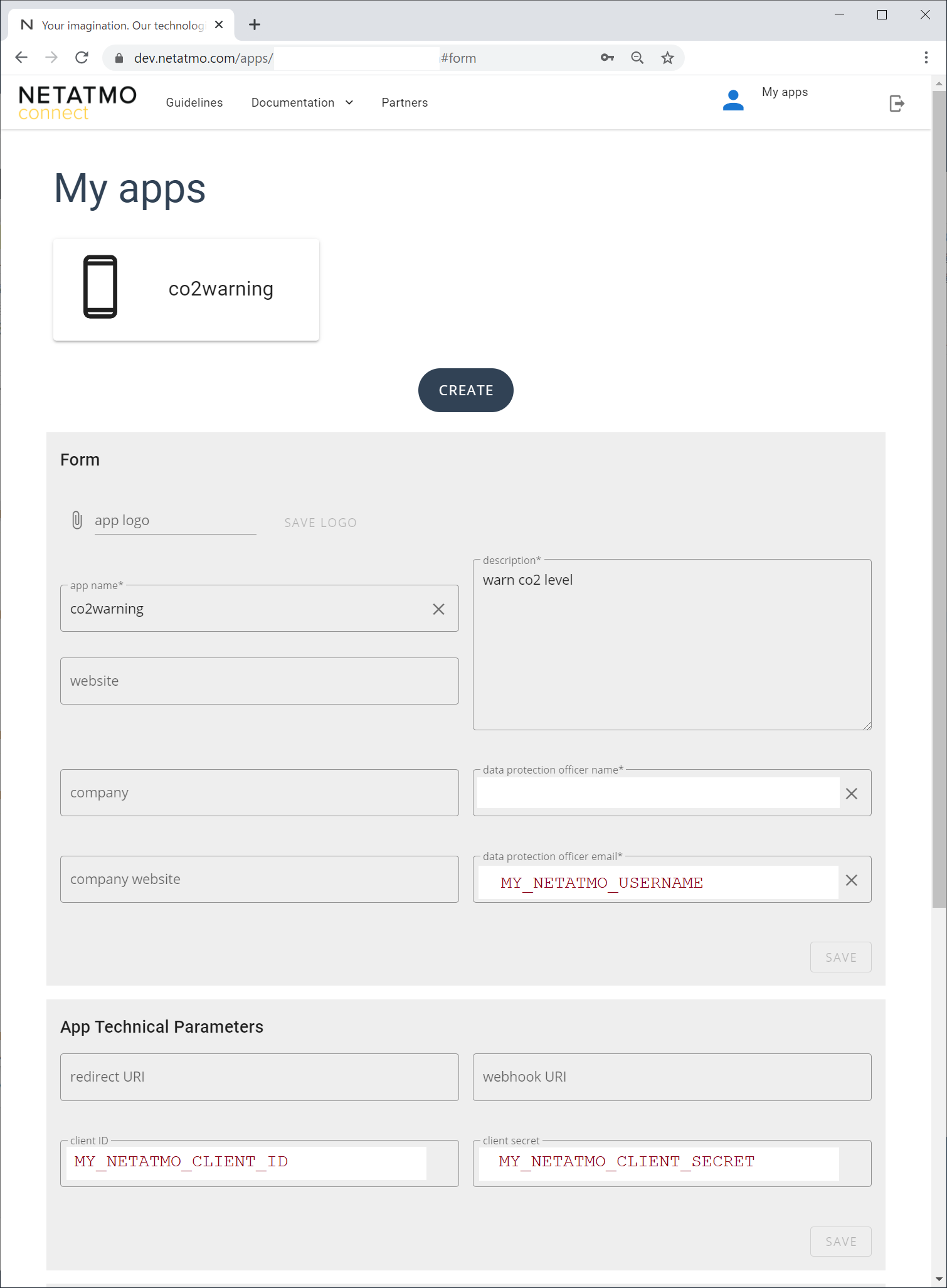
MY_NETATMO_CLIENT_ID と MY_NETATMO_CLIENT_SECRET には、dev.netatmo.com にログインして作成したAppの情報を設定する。例をこの後に示す。
MY_NETATMO_USERNAME、MY_NETATMO_PASSWORD には、netatmo に登録してあるユーザ名(メールアドレス)とパスワードを設定する。
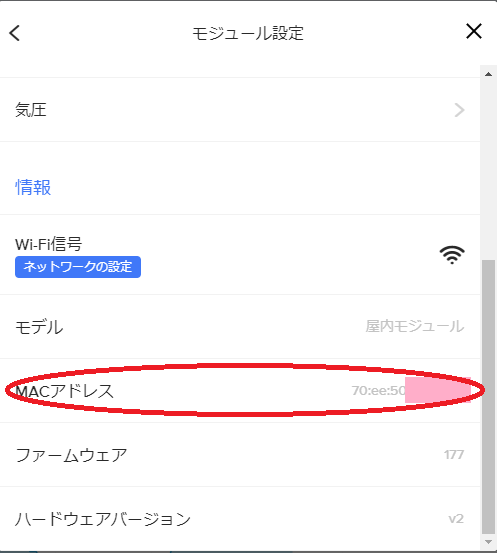
MY_NETATMO_DEVICE_ID には、NetatmoのステーションのMACアドレスを指定する。取得方法は後に示す。NetatmoのMACアドレスは、70:ee:50で始まるはず。「:」を「%3A」に変換して指定する。下の例では??の部分に対象のステーションに合わせた16進数を設定すれば良いはず。
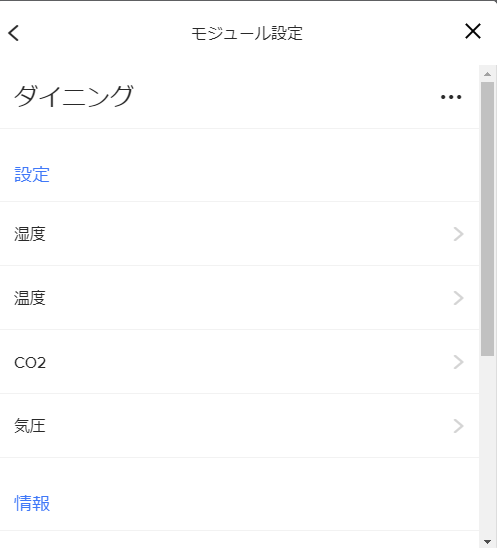
MY_TARGET_LOCATION には、二酸化炭素濃度を取得したいデバイス名を指定する。次の例では、「ダイニング」になっているが、環境に合わせて設定する必要がある。
|
1 2 3 4 5 6 7 8 9 10 11 12 13 14 15 16 |
// WiFi #define MY_WIFI_SSID "MY_WIFI_SSID" #define MY_WIFI_PASSWORD "MY_WIFI_PASSWORD6" // Netatmo #define MY_NETATMO_CLIENT_ID "123456789abcdef012345678" #define MY_NETATMO_CLIENT_SECRET "123456789AbCdEfGhIjKlMnOp" #define MY_NETATMO_USERNAME "MY_NETATMO_USERNAME" #define MY_NETATMO_PASSWORD "MY_NETATMO_PASSWORD" #define MY_NETATMO_DEVICE_ID "70%3Aee%3A50%3A??%3A??%3A??" // 70:ee:50:??:??:?? #define MY_TARGET_LOCATION "ダイニング" // Google Home #define MY_GOOGLE_HOME "Google Home Mini" |
dev.netatmo.com の My Apps に作成したAppの例
dev.netatmo.com のAPIを利用するためには、client id と client secret を取得する必要があり、そのためには、My Apps で App を作成する必要がある。
ここでは co2warning という App を作成した例を示す。MY_NETATMO_USERNAME、MY_NETATMO_CLIENT_ID、MY_NETATMO_CLIENT_SECRETに設定する値が示されているはずである。
Netatmo Weather Station の MACアドレスの取得
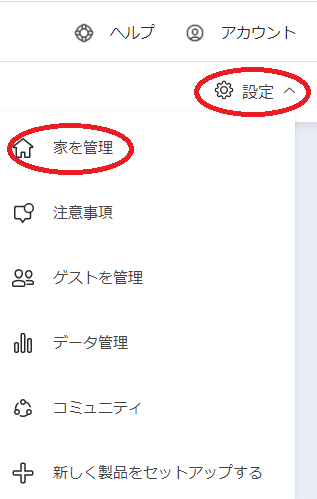
Netatmoのサイトにログインし、「設定」から「家を管理」を選択し、そこからステーションを選択する。
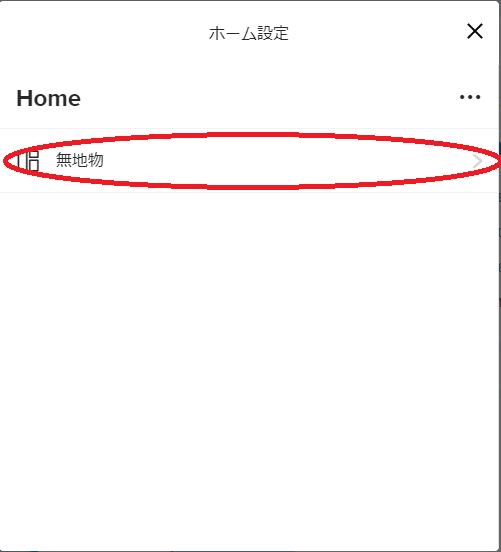
ステーションのモジュールを選択する。この例では「ダイニング」がステーションになっている。

最後の方にある MACアドレスの欄に記載の値がステーションのMACアドレスとなる。